

Facebook posts are powerful ways to get likes, comments, and shares, and the more engagement you get, the more it impacts your exposure (a.k.a. reach).
Facebook remains a major driver of brand traffic and engagement. Our 2026 social media management trend report shows that 44.6% of all posts scheduled through Sendible in 2025 were posted on Facebook.
Interactive Facebook posts can also help us collect valuable data to optimise your social media strategy in the future. In this article, we cover 8 ways to increase engagement with interactive content ideas.
Facebook posts key takeaways
- Interactive Facebook posts, like polls, quizzes, AMAs, and giveaways — drive engagement, comments, and shares, encouraging the algorithm to show your content to more people.
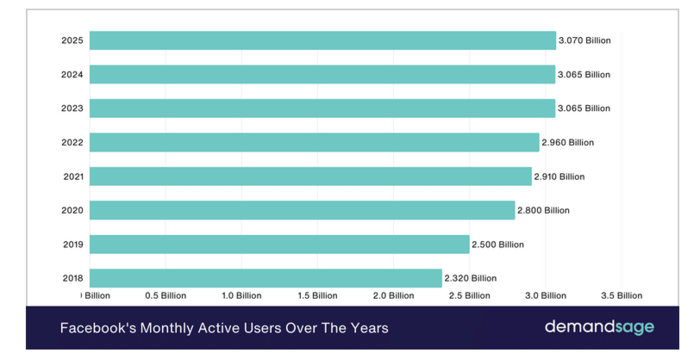
- Facebook remains a dominant social media platform, with 44.6% of all posts scheduled through Sendible in 2025 posted there, and over 3 billion monthly active users.
- Short-form video (Reels) between 90–120 seconds currently delivers the highest engagement rates on the platform.
- The more engagement your posts generate, the wider your reach. Helping you attract leads, drive traffic, and stay front of mind with followers.
- Seasonal and holiday content (Halloween, Valentine's Day, Christmas) is a great opportunity to layer in interactive posts and give engagement a quick boost.
- Use analytics to track what's working and continuously refine your Facebook content strategy.
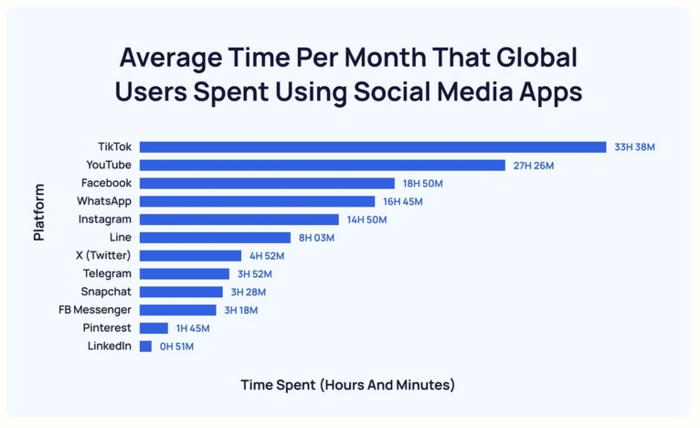
Updated 2026 Facebook stats
- Global users: Facebook currently has over 3.07 billion monthly active users as of Q2 2026 (Buffer).
- Trend: Short-form video (Reels) between 90 and 120 seconds now has the highest engagement rates on the platform (Sprout Social 2026 Index).
- New Feature: Facebook's "AI-driven recommendations" now account for a significant portion of feed distribution.
What is an interactive post on Facebook
An interactive Facebook post encourages users to like, comment, share, or click through (a.k.a. interact with the post).
There are a variety of posts that fall under this category, including:
- Quizzes, surveys, or polls: tap into people’s need to find out more about themselves or to test their knowledge
- 360 videos: allow followers to move around a real-life scene directly
- Product tags on photos: give shoppers a chance to click through to a landing page for a specific product they’re interested in. Not having to search for links in the copy improves the overall user experience.
- “Tag a friend” posts: encourage followers to mention their friends in a comment to spread your reach
- Reels) between 90 and 120 seconds now have the highest engagement rates on Facebook, so it’s well-worth using more of them when you schedule your content.
- “This or that” posts: gain more information about your followers by asking them to decide between two relevant things (e.g., “summer or winter” or “tea or coffee”)
- AMA threads: share your knowledge with your followers by encouraging them to submit questions for you, a team member, or an influencer to answer on a Facebook Live
How do interactive posts work on Facebook?
Facebook is an inherently social platform where people tend to engage and interact with friends, family, and brands they like. They’re used to interacting with posts, either by tagging a friend, sharing, liking, reacting, or commenting.
Interactive posts are designed to stand out and drive action.
Remember, there are more than 60 million business pages on Facebook, and standing out is crucial if you want to continue engaging followers and staying front of mind. Interactive posts help you do this.
And, by generating engagement, the Facebook algorithm is likely to push your posts to the top of user feeds.
Note: Interactive posts can be difficult to schedule on Facebook due to API limitations, but it’s worth testing them out to see what works for you and your audience.
How interactive Facebook posts beat the algorithm in 2026
Interactive posts, which are one of the best forms of community management you could engage in, come with a load of other engagement benefits, including:
- Wider reach: The more interactions you have, the more you’ll appeal to Facebook’s algorithm, which will reward you by showing your posts to more people.
- Generate leads: A wider reach means more opportunities to generate leads and increase conversions from your Facebook Page.
- Increase retention rates: Stay front of mind and remain relevant to your existing followers by staying at the top of their Facebook Feeds.
- Drive traffic: Encourage users to click through to your website or landing pages to increase visitor numbers.
- Stand out: Differentiate your brand from competitors by creating a highly engaged Facebook Page and creating an open dialogue with your followers.
- Personalise interactions: Use the information collected from your interactive Facebook posts to personalise future interactions you have with your audience.
8 high-performing Facebook posts to boost engagement
The best interactive posts on Facebook have a purpose.
This might be finding out more about your audience, promoting a new product with a giveaway, or creating deeper connections with a quiz, survey, or Q&A.
Here are some real-life interactive Facebook posts that work particularly well.
1. Host an AMA on Facebook (Live)
Eskwelabs partners with a group of scientists to run an Ask Me Anything session. Users are invited to submit their questions in advance or during the call.
Follow suit by collaborating with a team member or an influencer, and use the answers or recording to create an interactive Facebook post based on the submitted questions.
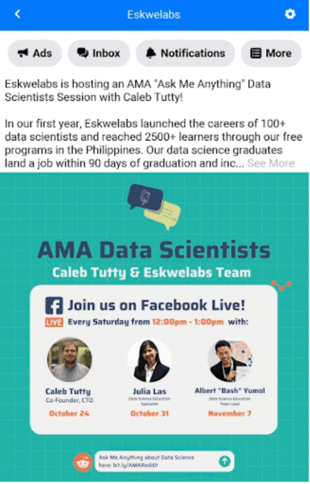
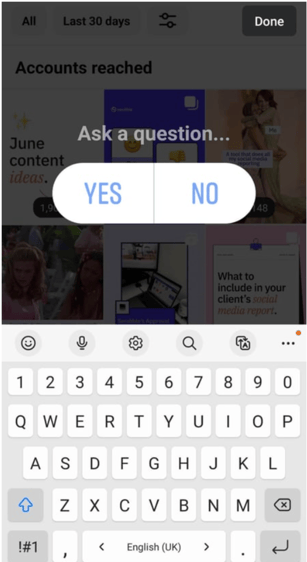
You can also use the Questions feature in Facebook Stories to invite your followers to ask you any questions or answer your own. To access this feature, simply tap on Stickers and then select Questions.
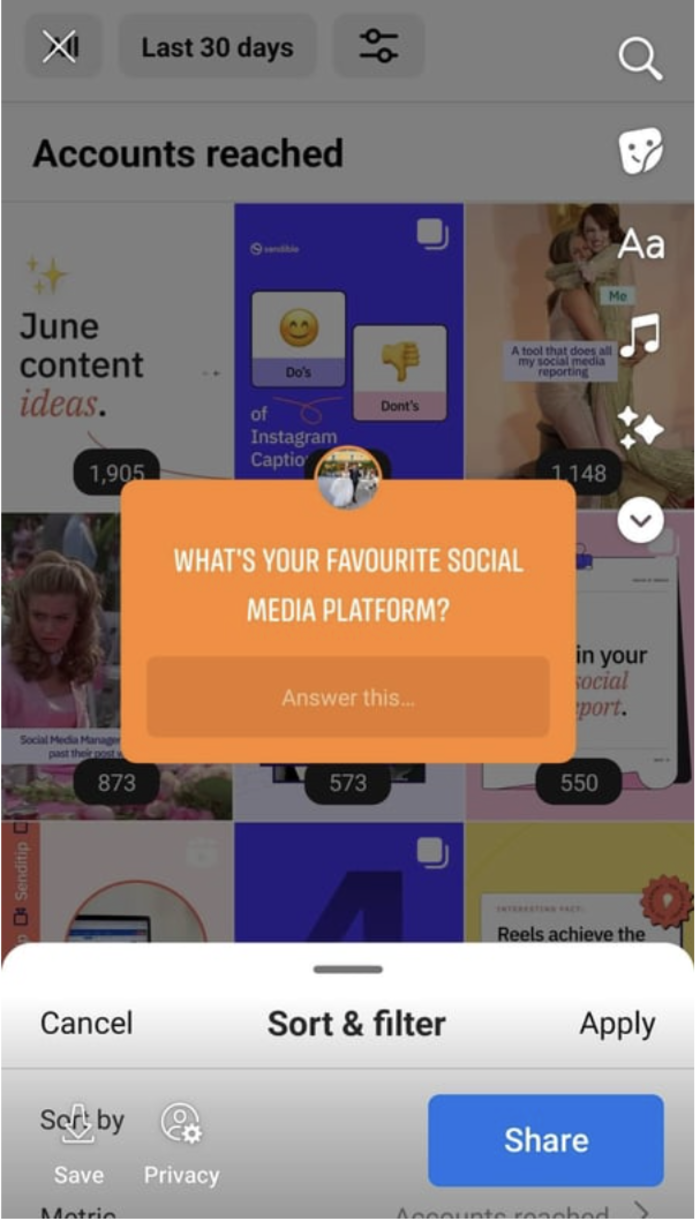
2. Create an interactive Facebook poll
Unfortunately, it is currently only possible to post Polls on your Facebook Page during a LIVE session or through a Facebook Story.
To add a poll to your Facebook story, simply tap on Stickers, choose Poll, and ask your question.
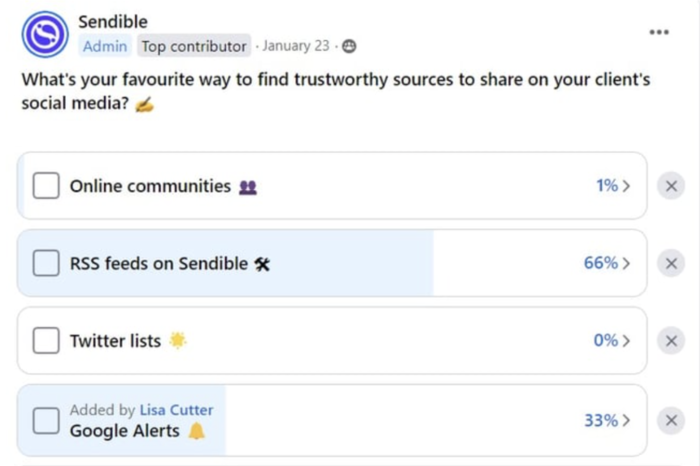
However, if you have a Facebook Group (and if you don't, now might be the perfect time to start one), you can easily post traditional polls to gauge interest, learn more about your members' preferences, or boost engagement rates.
Not only is this an interactive Facebook post that encourages members to participate, but it also helps your team tap into answers from people who might not check their Facebook stories regularly but are more active in groups.

3. Host a quiz on Facebook
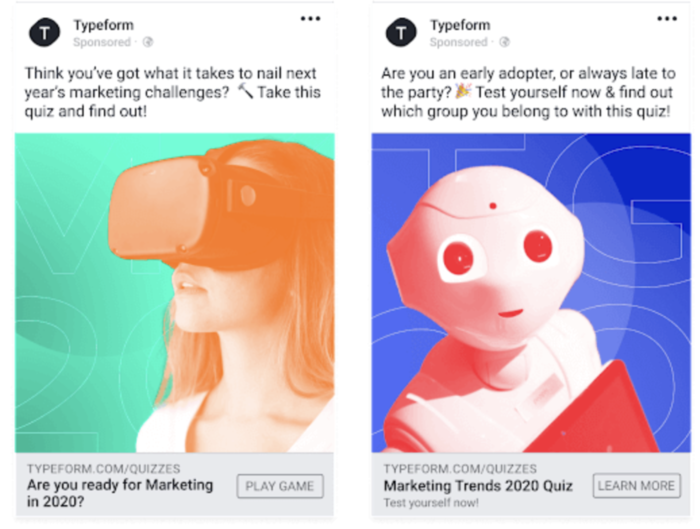
Typeform offers a couple of quizzes for its audience to take, depending on their interests.
This not only drives click-throughs but is also a great way to capture contact information. You can do a similar thing by testing your followers on a brand-related topic or asking them to find out something silly, like what house plant they are (there’s a reason Buzzfeed quizzes are still so popular!).
Alternatively, you can ask riddles or test followers’ knowledge by posting challenges that spark discussion directly on your Facebook Page, just like Haribo does:

4. Post a 360-degree video
The Laughing Cow USA takes its followers on a trip down memory lane by using Facebook’s 360-degree video feature to recreate a branded version of Where’s Wally.
This encourages people to interact with the post directly and can be great for showcasing a hotel or a destination for people who haven’t visited yet, as well as for real estate pages.

5. Add product tags to photos in Facebook posts
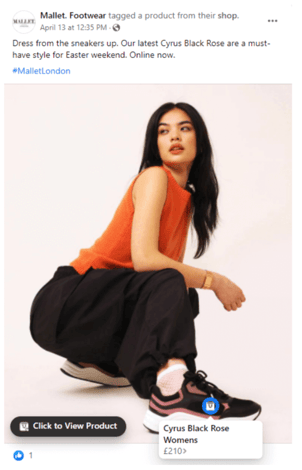
Mallet adds product tags to its outfit photos that followers can click on to find out more. This keeps followers on Facebook while reducing the steps in the buying cycle–the perfect way to drive both click-throughs and sales.
6. Ask followers to tag a friend on Facebook
Primark asks its audience to tag a friend who is obsessed with Bambi to promote their latest Bambi-related product.
This increases reach by using a digital form of word-of-mouth marketing (which is still incredibly powerful–if someone has been recommended or tagged by a friend, they’re more likely to follow you).
7. Run a Facebook contest or giveaway
Grove Collaborative adds an incentive to their quest for engagement by giving away a prize to a lucky follower–all they have to do to enter is like and comment on the post (a.k.a. interact with it in some way).
8. Encourage emojis in response to posts
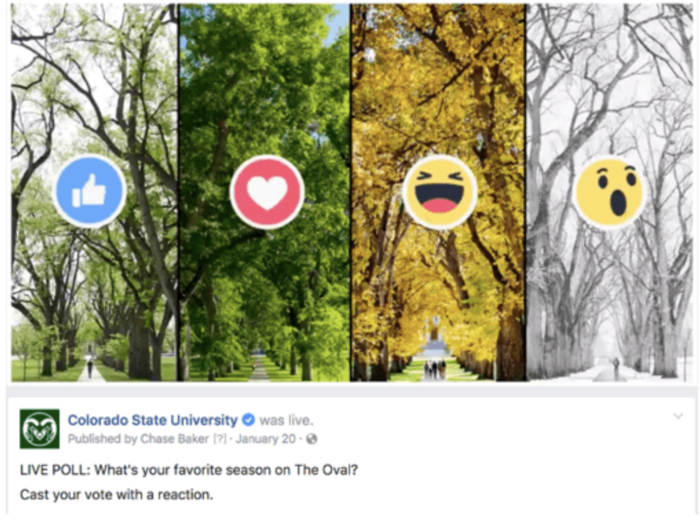
Colorado State University asks Facebook users who follow them to share their favorite season via emoji, lining up spring, summer, autumn, and winter with different reactions.
Do the same by either encouraging your audience to vote with a specific reaction or by dropping an emoji in the comments.
Best practices for Facebook posts in 2026
- Create high-quality, engaging content (interactive and static): Mix visuals, educational posts, interactive elements, and authentic storytelling to keep your audience engaged and maintain consistent branding across all formats.
- Plan with a content calendar: Schedule posts in advance to stay consistent, align content with key dates, and maintain a balanced variety of formats.
- Track your performance: Regularly monitor key metrics like reach, engagement rate, CTR, and conversions to make data-driven decisions and refine your strategy.
- Post at the right time: Analyse audience activity patterns, research industry benchmarks, and experiment to find the optimal posting times for your audience.
Seasonal interactive Facebook posts
The holidays are a great time to reach new people and give your Facebook engagement levels a quick boost.
Before checking out examples of seasonal interactive posts, make sure to watch our video with Desiree Martinez, agency owner and Sendible's loyal customer, to learn more about holiday social media marketing:
Halloween interactive Facebook posts
Follow Boohoo's example and share some interactive goodness during the spooky season. The popular clothing brand uses a top list of Halloween movies and invites followers to share their thoughts in the comments.
Interactive Facebook Posts for Valentine's Day
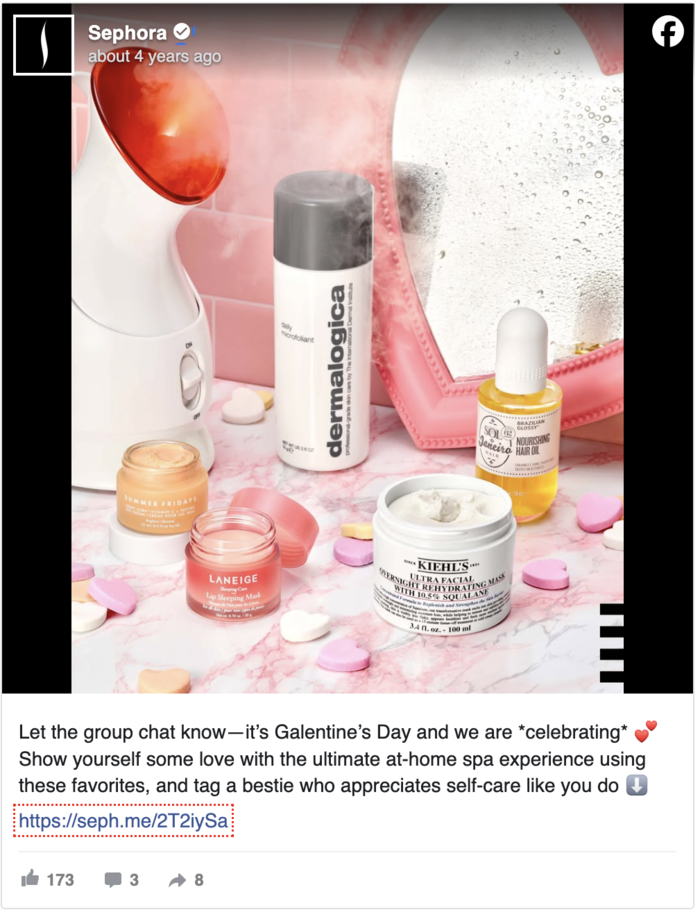
Another one to plan into your social media holiday calendar. Valentine’s Day is all about spreading the love, and it’s the perfect holiday to encourage followers to tag a friend as Sephora does:
Here are some more ways you can use social media on Valentine’s Day to engage your followers and promote your business.
Engaging Christmas interactive Facebook posts
Christmas is the time for giving and receiving, making it the ideal time of year to share interactive posts and spark engagement.
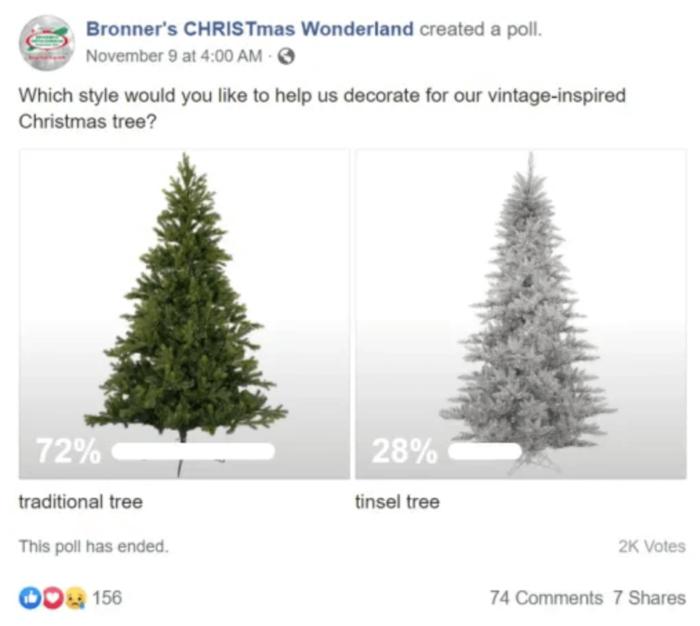
Bronner’s uses a poll to get input from its followers and gain insight into their unique preferences.
Increase engagement levels with interactive Facebook posts
Interactive Facebook posts increase engagement by encouraging followers to like, comment, and share.
Not only does this spread your reach, but it also tells Facebook’s algorithm that people like what you’re sharing, which in turn will mean it’ll show your posts more.
In addition, you can use responses (particularly to polls, surveys, and Q&As) to learn more about your audience and their interests.
Try adding some interactive posts to your content calendar, but make sure it’s content your audience would be interested in and is related to your brand, so you stay front of mind and relevant.
Check out our social media holiday calendar and start planning your posts.
You can also use Sendible's analytics feature to keep track of what is working for your brand as you try different types of Facebook posts for your page.

Try Sendible free with 14-day free trial.
Leverage Sendible’s extensive integrations to create, schedule, publish, and engage with your posts seamlessly.

Text copied!