

In this post, we show you how to repost an Instagram story, including how to repost an Instagram story when not tagged.
After a series of 2026 updates, we’ve reviewed the best approach, along with hidden tools and alternatives for different scenarios.
Publishing high-quality Instagram content can be time-consuming and resource-intensive. But you don’t always have to create new stories and posts. You can repost an Instagram story instead
However, reposting on the Instagram app has some limitations and rules. Getting it right is important so you don’t damage your brand reputation.
How to repost an Instagram Story when tagged
Reposting an Instagram Story when you’ve been tagged is simple.
If someone tags you (or a brand, company you’re managing as a social media manager) in their Story, Instagram automatically sends you a direct message that includes the Story. From there, you can easily share it with your own followers. Here’s how:
- Open the Instagram Story where you've been tagged.
- Tap the "Add to Story" button that appears.
- Customise the Story by adding text, GIFs, emojis, stickers, or other creative elements to make it your own.
- Share the updated Story to your Instagram Story for your followers to see.
This method works only for Stories where you've been mentioned. If you want to share a Story you weren’t tagged in, you’ll need to use alternative methods like taking a screenshot or using a third-party app. We cover all of those methods in this article.
How to repost an Instagram Story if you're not tagged
Instagram limits reposting a story to stories that you are actually tagged in. If you have not been tagged in a story, your best bet would be to use a screen recording app or the feature available on all iPhones to record the story and then repost it.
If you have been tagged, you simply go to the story, select 'Add to your story' to repost it to your own. Instagram makes this pretty simple by sending you a mention when you are tagged in a story.
The video below guides you through this step-by-step:
What are some alternatives to reposting a Story besides screen recording?
Other features that come close to reposting a story would be reposting a reel instead. You can post any account's posts or reels to your story, unless their account is private or they have specifically toggled the option to prevent others from reposting their content (Source: Sendible's Guide on How to Schedule Instagram Stories).
If the account is public and reposting is allowed, it would look something like this. The screenshot below is when we tried sharing a reel on Sendible's account from another account:
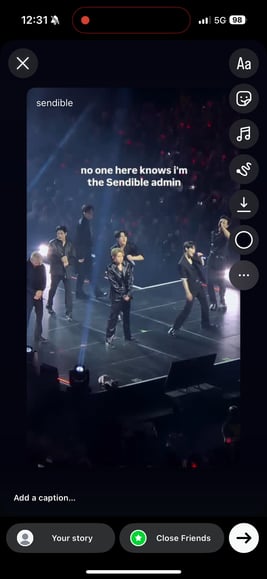
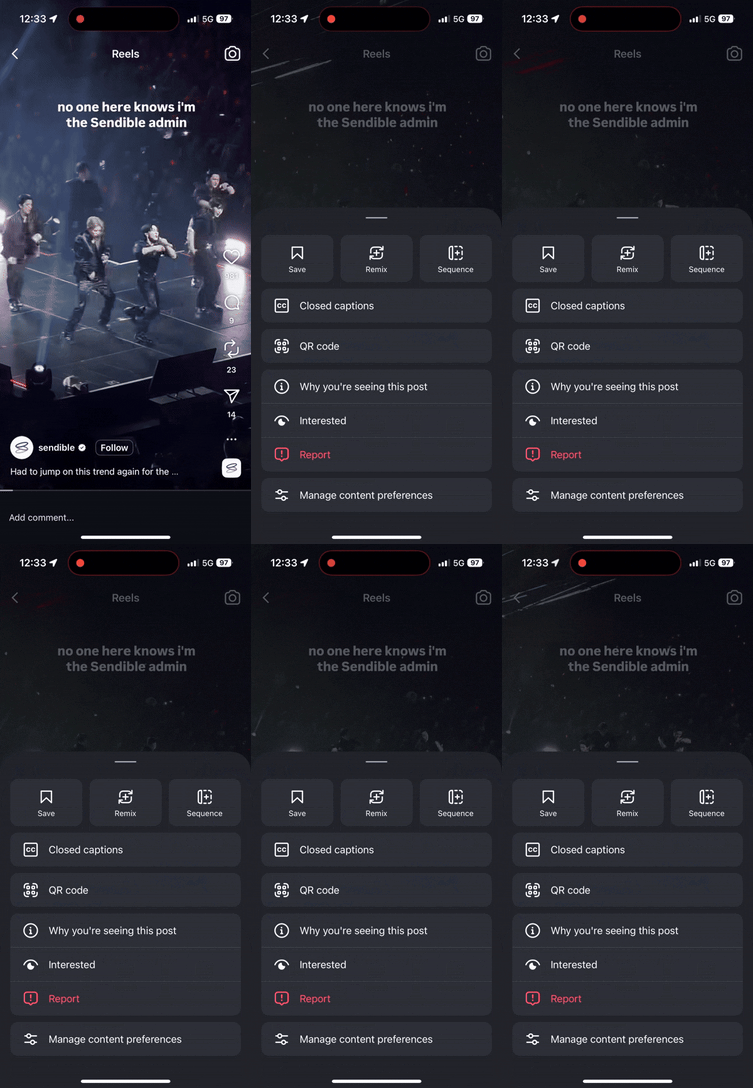
Alongside this option, you will also see other options when you select the three dots next to the reel, including saving the post, remixing it, and adding it to a sequence.
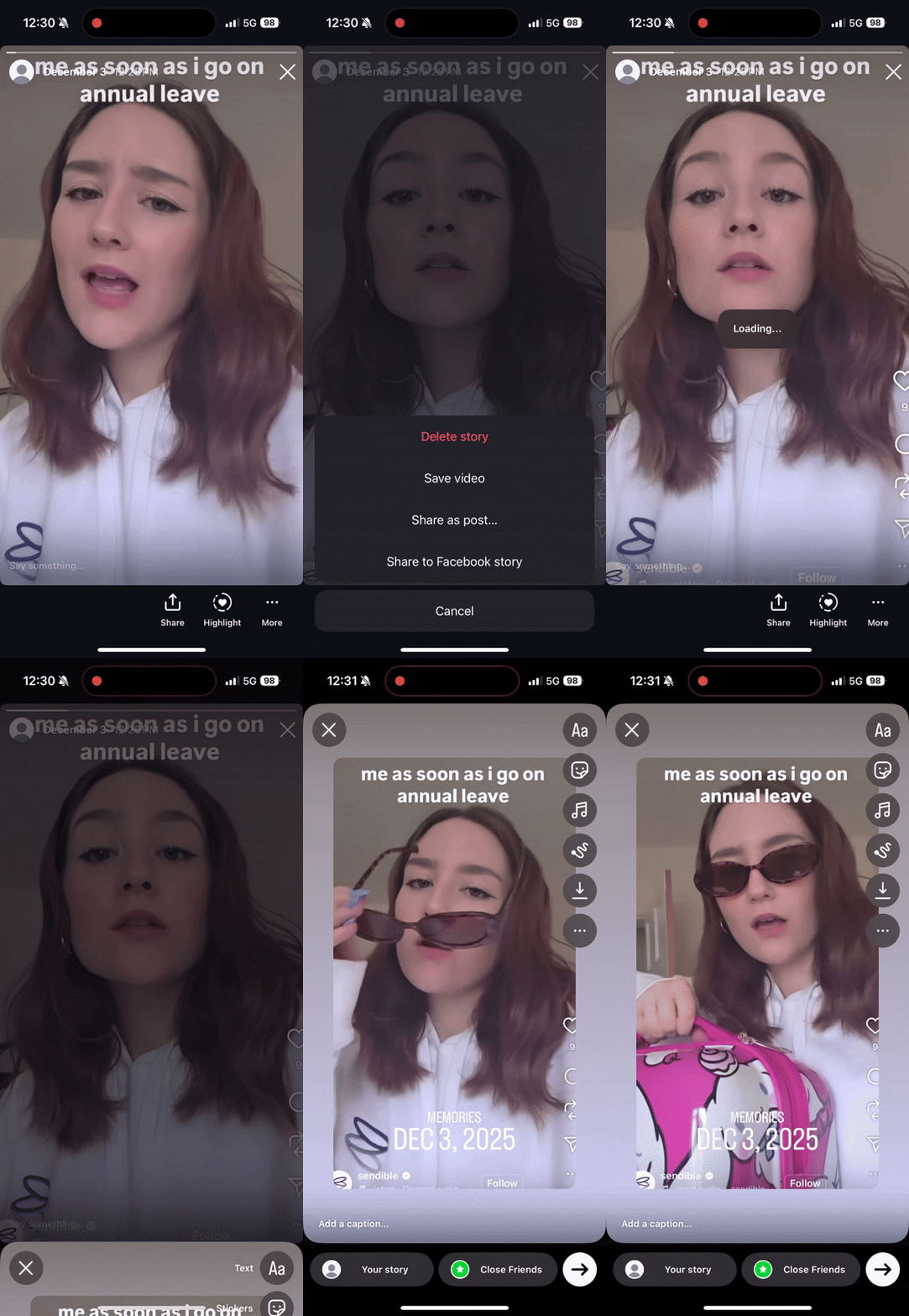
Another option is to repost stories of your own that are now archived. You can go to the archive in your account and select the share button, as shown below, to get the option to 'Share as post..' or share it as a Facebook post if you have an active presence there as well.
This is a great way to push content that did well out again and give it a second life.
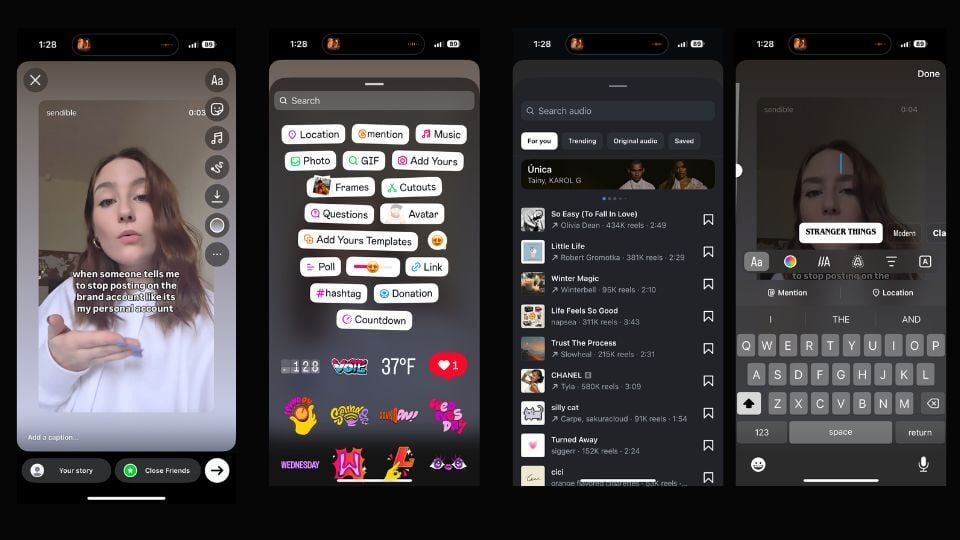
While you are reposting a story from another account or an archived reel from your own, you have the option to give it a fresh look by adding text, stickers, or music, as seen below:
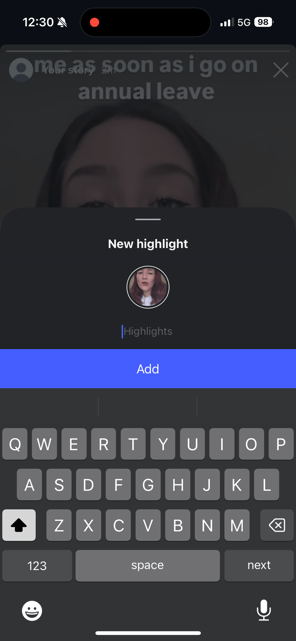
As you probably know, you can also repost your own stories to your highlights to expand reach and keep good content findable after the story expires. You can only do this for your own stories at the moment, as seen in the screenshot below:
The 2026 aggregator penalty: Ethical resharing guide
Until recently, Instagram was fine with reposts. However, Instagram’s now cracking down on “unoriginal content”, and sadly, that includes reposts. Here is what you need to know:
- The 10-Repost and aggregator threshold: Accounts posting 10+ reposts within 30 days are now completely excluded from Explore and Reels recommendations. You’ve got to be careful (especially as a brand, creator, or a business using Instagram) not to exceed that 10-repost threshold in any 30-day window.
- Original content imperative: Content that is taken from other users and posted without material enhancements (e.g., without your own commentary, green-screen reactions, memes or significant edits) gets penalised.
- Engagement shift: "Shares/DMs" are the #1 ranking signal in 2026, making the "how" of reposting more about private community building than public broadcasting.
- Material edits rule: Instagram now explicitly requires that third-party material include "material edits" (e.g., unique text overlays that provide original context, creative graphics, or use of the native Remix tool) to avoid a distribution penalty.
- The shift to "Views": Instagram transitioned to "Views" as the primary metric across all formats (including Stories), prioritising shareability (Sends Per Reach via DMs) over passive likes.
So, this means you can still use the information in this article. But don’t go over 10 reposts in a 30-day period.
How to repost Reels and Feed Posts to Stories
The good news here is that Instagram does the heavy lifting for you. When you share a Reel or Feed Post to your Stories, the platform automatically tags and links back to the original creator.
For marketing agencies and brands, curating external content like this is a brilliant shortcut. It keeps your content calendar active, highlights industry partners, and breaks up your grid without demanding extra design time.
When you find a post your audience will love, here is the quick workflow to reshare it:
- Tap the share icon: Hit the paper aeroplane icon under the Reel or post.
- Send it to your Story: Select "Add to Story" to pull the asset directly into your editing screen.
- Add a layer of context: Don't just post a "naked" reshare. Type out a quick note or add a GIF explaining why you're sharing this. Giving your audience a reason to care keeps them from tapping past your Story, and it actively helps you avoid raising red flags.
- Drop an engagement trigger: Use a native Instagram poll or slider sticker. Throwing in a quick question, like asking if they agree with the post, takes two seconds but does wonders for your engagement metrics. Bonus points if you make it extra engaging for the audience and ask them if the feed post was truly the best out of the bunch.
Want to repost and boost your Instagram strategy?
Benefit from Sendible’s Instagram features: Schedule and share a range of Instagram content formats at optimal times, use the right hashtags, and manage your community.

FAQs about reposting on Instagram
Why can’t I repost a specific Instagram Story I’m tagged in?
If you receive a mention notification but don't see the "Add to Story" button, it means the original creator has sharing turned off in their privacy settings. For your brand to reshare public mentions, the original poster must have "Allow resharing to Stories" toggled on in their account settings.
Is it illegal to repost someone else’s Instagram Story without permission?
While Instagram automatically provides a link to the original creator when you reshare standard Reels or feed posts, copying or screen-recording a Story you aren't tagged in requires explicit permission. As a general rule for brands and agencies, always send a quick DM to get consent before publishing user-generated content to protect your brand reputation.
The best way to reach out to a creator is to direct message them (avoid leaving a generic comment on their post). Here’s an outreach template you can use:
What happens if I go over the 10-repost threshold on Instagram?
Under Instagram’s updated algorithm rules, accounts that post 10 or more pieces of unoriginal or reshared content within a rolling 30-day window are categorized as aggregators. This causes the account to be entirely filtered out of the Explore page and Reels recommendation feeds, severely limiting your organic growth.
Can you schedule Instagram Stories in advance?
Yes! While the native Instagram app forces you to publish content live, you can visually plan, draft, and schedule your Stories ahead of time using a dedicated social media dashboard. Platforms like Sendible’s Instagram Scheduler allow you to orchestrate your entire brand presence—from Stories to Reels—automatically at optimal times.
Can I repost an expired Story to my Instagram Highlights?
Yes, but you can only do this for your own content. If your own Story expires after 24 hours, it is saved securely in your internal Instagram Archive. You can head over to your Archive at any time, tap the share icon, and save it directly to a public Highlight row so your followers can access it indefinitely. Competitor or third-party Stories cannot be saved to your Highlights unless you copy and re-upload the file with permission.
How to generate engagement with Instagram Story reposts?
Ready to include Instagram Story reposts in your social media strategy? Here are some top tips to remember to ensure you’re getting the most out of resharing content.
- Get the best image quality
- Curate user-generated content
- Acknowledge accounts that have mentioned you
- Add your stamp to reshared stories
- Create Highlights of your reposts
Try Sendible free with 14-day free trial.
Leverage Sendible’s extensive integrations to create, schedule, publish, and engage with your posts seamlessly.

Text copied!