

Instagram broadcast channels are a powerful tool for creators and brands looking to engage directly with their most dedicated followers.
This interactive messaging feature allows creators to share exclusive content, updates, and interactive messages in a chat-like experience. Instagram broadcast channels helps businesses, influencers, and marketers connect with their audience beyond the standard feed.
In this guide, we’ll cover everything you need to know about Instagram broadcast channels, including how to create one, best practices for engagement, and strategies to grow your audience.
Let’s dive in.
TL;DR: Use Instagram broadcast channels to increase engagement in 2026
- It’s crucial to remember that Instagram doesn’t allow third-party tools API access to schedule broadcast channel content in advance.
- Instagram broadcast channel content needs to be live, which means using social media scheduling tools like Sendible for automated content. Then planning in your calendar when you’re going to do live broadcast channel content.
- Used the right way, Instagram broadcast channels can have 10X the engagement and generate 10X as much revenue as a brands main feed. Even if you’re only engaging with 10% of your audience; these are a brand's biggest fans.
- Connect broadcast channels with automated DMs so that you can save time engaging with fans, and increase conversion rates.
- Don’t only re-post what’s been done via Stories or in primary feed posts. Create new content, make it worth people clicking on a broadcast.
- If you don’t know where to start, it’s worth conducting a quick Instagram audit: Ours is free!
What are Instagram broadcast channels?
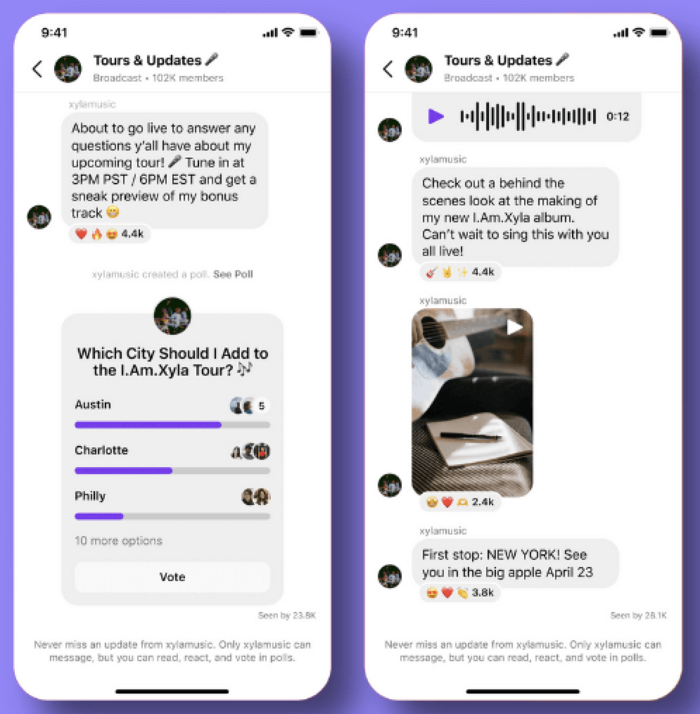
Source: About Instagram
Instagram broadcast channels are interactive messaging spaces where creators can share updates, announcements, and exclusive content directly with their followers.
💡 Remember: Instagram doesn’t allow third-party tools API access to schedule broadcast channel content in advance.
Instagram broadcast channel content needs to be published live. Now, we know that’s time-consuming for social media teams. So, we recommend scheduling everything else in advance, and then setting aside time for a live Instagram broadcast.
We provide more information on how to manage live broadcasts, including a DM message framework further down this article.
How followers interact with Instagram broadcast channels:
- Reactions: Followers can use emojis to react to messages.
- Polls: Creators can engage their audience by gathering feedback.
- DM Visibility: Channels are found in followers’ Instagram DM inbox, making them easy to access.
- Nested Replies: For brand and business channels, agencies can turn on "Allow members to reply" under Channel Controls. So, you can build micro-comment systems right inside the DM inbox without cluttering the main broadcast flow.
- Timed Prompts (also known as Polls): Use the 24-hour question prompts (text or photo responses) to run real-time audience research sprints for clients.
This exclusive, interactive format helps creators and brands maintain a direct line of communication with their audience without the noise of a group chat.
Social media management software like Sendible makes it easier to manage and accelerate your Instagram growth using strategies like Instagram Broadcast Channels.

What are the benefits of Instagram broadcast channels for business?
From a business perspective, there are a few key benefits to investing time and resources in maintaining an active Instagram broadcast channel.
💡 Significant potential ROI: Instagram broadcast channels can have 10X the engagement and generate 10X as much revenue as a brands main feed. Even if you’re only engaging with 10% of your audience; these are a brand's biggest fans.
1. Build and interact more directly with followers
The beauty of broadcast channels is that you can interact with your account followers more directly thanks to their messaging-platform-like setup.
Take Tank Sinatra, a meme sensation, as an example.
While he uses his main feed to post content, he uses his channel to update his closest followers on merch he is releasing. He updates them before he updates the rest of his followers on his main feed, which helps foster a deeper connection with his biggest fans.

2. Make important announcements
If you run your company’s social media and are active on other platforms, you could use your Instagram broadcast channel to announce the new newsletter or a new article posted on the blog. Make them an integral part of your Instagram management plan.
Alternatively, suppose you are an entertainer, author, or entrepreneur who frequently travels to meet fans. Announcements are part of getting people excited for the event, and that's where broadcast channels come in.
While your main feed may not be the best place for these types of announcements (since you don’t want an event or newsletter announcement to live forever on your feed), your broadcast channel could be the right place.
Josh Richards, a media personality, uses broadcast channels to update his followers when he drops a new trailer or a new TikTok video. The good thing about this is that TikTok's algorithm favours engagement, and POV content tends to trigger strong reactions.
POV content "cuts through the noise”, and as research shows, short-form video has a 2.5X higher engagement rate than other content formats.

3. Get feedback from followers
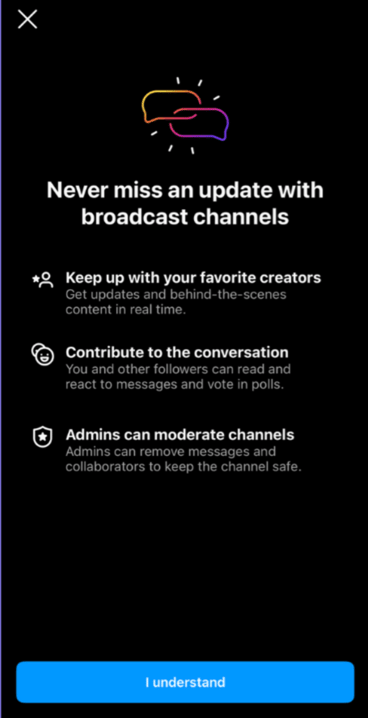
While followers can not reply to your messages in the broadcast channel, they can react to your messages and vote in your polls.
This is a great way to ask your followers what they think.
Here are some ways you could employ this benefit in your own strategy:
- Ask followers on the broadcast channel what they think of new merchandise design ideas.
- Let your followers vote in a poll asking what new feature they want to see in your tool.
- At the end of one of your broadcast channel messages, ask your followers to react with a certain emoji (like a thumbs-up emoji for "Yes" or a thumbs-down emoji for "No").
4. Collaborate with creators and influencers
If you are looking to grow your Instagram broadcast channel by collaborating with other creators and influencers, inviting them to your channel could be a great way to connect.
You can grant another account access to your broadcast channel by adding them as a collaborator.
This way, they can message your audience within the broadcast channel and potentially bring their own audience with them.
Be sure you have a firm strategy in place for when you collab, as it could cause an influx of messages into your account. Sendible’s Priority Inbox is the best solution to ensure you don’t miss any messages!

Micro-Influencers vs. Macro-Influencers vs. Celebrities – Understanding The Difference
5. Grow your advocacy marketing with a broadcast channel
When you cultivate a community within your broadcast channel, you begin to attract followers who become brand advocates. Known as UGC marketing, advocacy marketing brings interest in your company when passionate followers share their positive feelings about your brand.
This will help your company grow further, since nothing carries more weight than a genuine recommendation from a friend.
Before we get into more useful advice about Instagram broadcast channels, we need to stop and ask ourselves: Channels or Stories, which is better for brands?
Instagram broadcast channels vs. stories: which should you use?
Instagram stories is a fantastic content medium. However, you don’t need to choose between Stories and broadcast channels.
There is room for both in your Instagram content strategy.
Just make sure you aren’t just re-using Stories content via broadcast channels. Otherwise, there’s no reason for fans to spend watching what your channel posts. You need to be using fresh, original content on your channels.
Because people love raw, unfiltered, unedited vertical videos, that could be a great way to engage in the most authentic way possible with fans and followers.
8 tips to maximise Instagram broadcast channels
Instagram broadcast channels provide a direct and engaging way to connect with your audience. To keep followers interested and maximise engagement, use these eight key strategies.
1. Share voice notes for a personal touch
Voice notes help humanise your brand and make your messages feel more authentic. Whether it’s a simple greeting, an exclusive announcement, or a behind-the-scenes update, voice messages add a level of intimacy that text alone can’t achieve.
2. Use multiple message formats to increase engagement
Instagram broadcast channels allow you to post a variety of content formats, including:
- Polls – Encourage audience interaction and feedback.
- Images & videos – Showcase behind-the-scenes content, product launches, or exclusive sneak peeks.
- Links – Direct followers to blog posts, special offers, or sign-up pages.
When you use multiple formats, you keep your content dynamic and appealing to different audience preferences.

3. Launch new products or exclusive content
One of the best ways to keep your channel active is by offering exclusive content that followers won’t find on your regular Instagram feed.
- Announce product launches before they go public.
- Let followers vote on branding, features, or upcoming releases.
- Share exclusive discounts or behind-the-scenes previews.
Giving your broadcast channel an exclusive feel encourages more followers to join and stay engaged.
4. Create multiple channels for different topics
If your brand covers multiple topics, consider creating separate channels for different audience segments.
- This helps avoid content fatigue. Followers only receive updates relevant to their interests.
- It allows for better targeting when making product announcements or launching campaigns.
- Segmentation improves engagement and conversion rates, as messages are more relevant to each audience group.
5. Tips for using POV in social media marketing
For marketers, the best part about using POV content as one of your content pillars is that it's straightforward. It’s pretty easy to come up with creative ideas for how to use POV content, and you can record and post something fairly quickly.
6. Use broadcast channels to drive automated DMs with highly engaged fans
Because broadcast channels happen in DMs they’re ideal for automated engagement with a brand's biggest fans.
The good news is, social media managers don’t need to do all of this manually. You can use word-prompt-based trigger tools like ManyChat or similar tools) to drive conversions.
See our example template below:
7. Use our: Welcome message template
This is a way you can use channel engagement via automated DM-based messages:
“Hey, Great to have you here! I’m launching exclusive new merch on this channel in the next 24 hours. Message back, “I’m in!” for an exclusive discount code”
For brands or businesses that aren’t selling products, you could go with something less transactional:
“Hey, welcome to our more exclusive fans group. Want to find out more about [brand or personal name], go here: [Link]. We’ll be sending content you can’t find anywhere else here, or via our Newsletter, where you can also sign-up to stay connected: [Link].”
8. Have an 80/20 content split in channels and DMs
With any social content channel, you can’t overpromote offers, products, or services.
Stick to the 80/20 rule:
- 80% educational, entertaining, or edutainment: Whatever works for your brand. Keep it that way in broadcast channels.
- 20% promotional, making this type of content more exclusive in broadcast channels.

How to set up Instagram broadcast channels in 2026
Setting up an Instagram broadcast channel takes just a few minutes and allows you to engage with followers directly, share updates, and build a stronger community. Follow these simple steps:
Step 1: Open Instagram DMs
Go to your Instagram Direct Messages (DMs) by tapping the messenger icon in the top right corner of your home screen.
Step 2: Start creating a new channel
Tap the pencil and pad icon (the same button used to start a new message). From the menu, select "Create broadcast channel."
Step 3: Name and customise your channel
- Enter a channel name that reflects your brand or topic.
- Choose whether to display the channel on your profile so followers can join easily.
- Select the audience – you can make it open to all followers or restrict it to a select group.
Step 4: Finalise and launch
Once you're happy with your settings, tap "Create broadcast channel." Instagram will now prompt you to send your first message to invite followers and start engaging.
Who can create an Instagram broadcast channel?
Instagram broadcast channels are available to professional accounts, allowing creators, influencers, and brands to engage directly with their audience through one-to-many messaging.
Eligibility requirements for Instagram broadcast channels
To create an Instagram broadcast channel, your account must meet the following criteria:
- You must have a Professional account. Instagram allows both Creator and Business accounts to create broadcast channels. If you’re also using a Personal account, you’ll need to switch to a Professional account in your settings.
- Your account must comply with Instagram’s community guidelines. If it has been restricted due to policy violations, you may not be eligible.
- The feature must be available in your region. Instagram broadcast channels are rolling out globally, but availability may still be limited in certain countries.
How to check if you can create a broadcast channel
Want to see if your account is eligible? Follow these steps:
- Open Instagram and go to your Direct Messages (DMs).
- Tap the pencil and pad icon in the top right corner to start a new message.
- If the "Create broadcast channel" option appears, your account is eligible.
- If you don’t see the option, check whether your account is a Creator profile, or wait for Instagram to roll out the feature in your region.
How can followers find a creator’s Instagram broadcast channel?
Finding and joining an Instagram broadcast channel is simple, but many users may not know where to look. Here’s how followers can access a creator’s channel and what it means for social media managers.
Step 1: Go to the creator’s DMs
To find a creator’s broadcast channel, a follower must open a chat with that creator on Instagram.
Step 2: Check for the broadcast channel button
If the creator has a broadcast channel, a button will appear at the top of the chat, allowing the follower to tap to join instantly.
Step 3: Join and interact with the channel
Once inside the channel, followers can:
- Receive updates from the creator.
- React to posts or participate in polls.
- Mute notifications if they prefer not to receive alerts but still want access.
- Share the channel link with others.
Step 4: Share a broadcast channel link
Followers can copy and share a link to any broadcast channel they’ve joined. This makes it easy for users to invite others to participate in exclusive creator content.

What does this mean for social media managers?
For brands and businesses, Instagram broadcast channels offer a powerful way to connect with audiences, and getting followers to join is key. Here’s how to increase your channel’s visibility:
#1 Share your broadcast channel link across platforms
- Post it in Instagram captions, bios, and other social media accounts.
- Promote it in email marketing campaigns or blog posts.
#2 Promote your broadcast channel on Instagram Stories
- Use the ‘Share to Story’ feature to highlight key messages from your channel.
- Encourage engagement by adding polls, stickers, or CTA buttons.
Wrapping it up: Instagram broadcast channels
As you wrestle with whether creating a channel is the right move for you, take a minute to step back and reevaluate your Instagram strategy. Using an Instagram audit checklist (ours is free!) is a good first step.
You might discover your goals are no longer what they used to be or that the audience persona you are trying to connect with has changed. Either way, in social media strategies (and life), taking a step back is often a big part of positive change.
Social media management software like Sendible makes it easier to manage and accelerate your Instagram growth using strategies like Instagram Broadcast Channels.

Try Sendible's Instagram scheduler for free.
Start your 14-day free trial to explore all the features you need to grow your Instagram presence while staying true to your voice.

Text copied!